Open Source
Expertrees
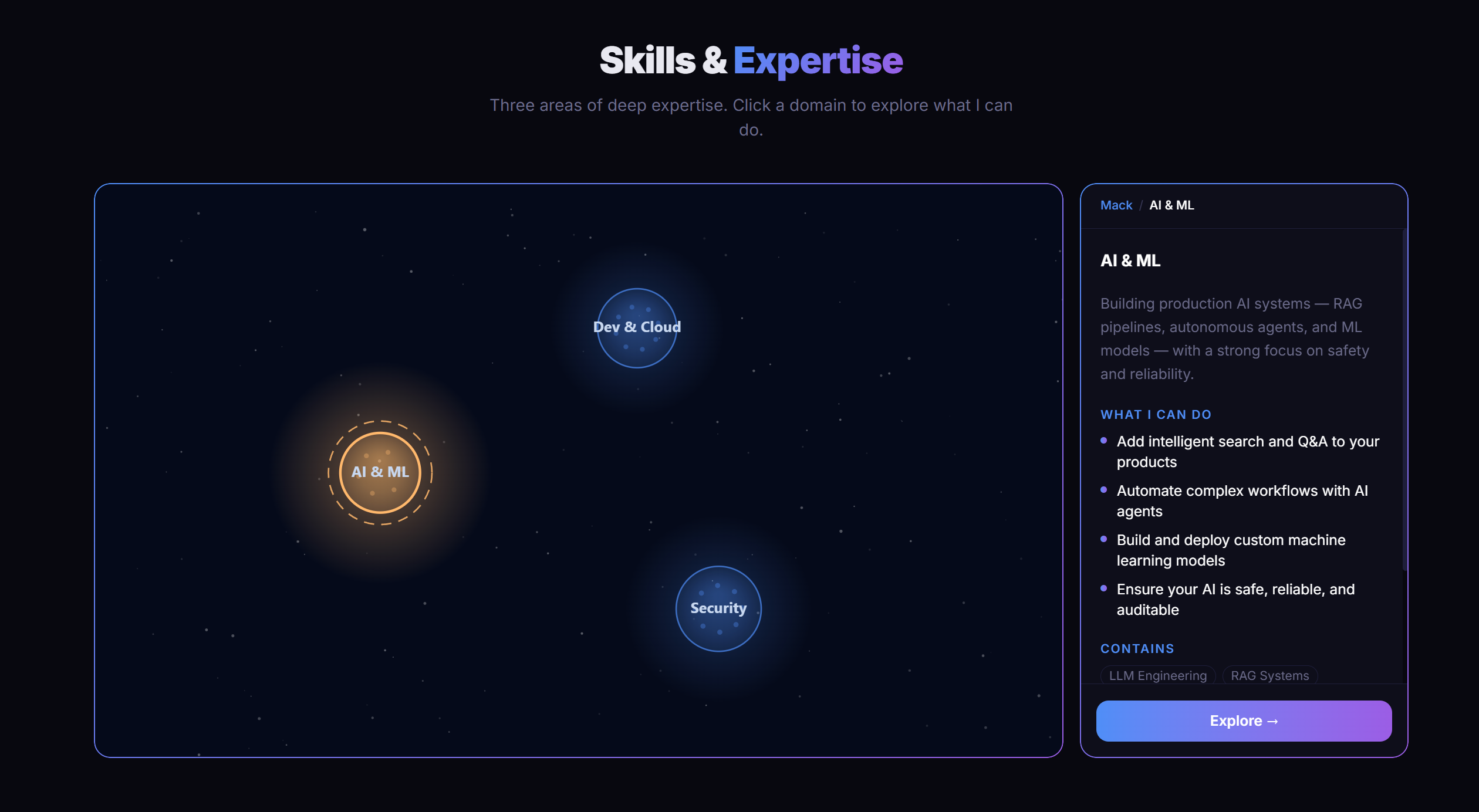
Skill graphs and knowledge hierarchies are hard to show in a way that feels natural to explore. Expertrees renders them as interactive star maps — luminous bubble nodes you traverse level by level, each context revealing its own constellation of children.
Overview
Knowledge Graphs That Feel Like Navigation, Not Diagrams
Standard graph visualizations optimize for showing everything at once — which works fine for small graphs but becomes an unreadable tangle the moment a real knowledge domain gets involved. Expertrees takes a different approach: you never see the whole graph. You navigate it.
Clicking a bubble node enters its context, replacing the current view with that node's children — their own constellation, sized and laid out by a D3 force simulation. Going back pops the navigation stack. The result feels less like inspecting a database and more like exploring a space.
The library ships as four separate npm packages under the @expertrees scope — a framework-agnostic core plus thin adapters for Vue, React, and Angular. This site uses @expertrees/vue to power the interactive skill tree on the About page.
Architecture
One Engine, Four Adapters
The core package has zero framework dependencies — it takes a raw HTMLCanvasElement and owns everything from there: force layout, animation loop, input handling, theming. Each framework adapter is a thin wrapper that handles mounting the canvas, forwarding reactive props, and translating framework lifecycle events into engine API calls.
@expertrees/core
Framework-agnostic engine. Canvas renderer, force layout, interaction controller, animation loop, and theming — no framework dependencies.
Peer: None
@expertrees/vue
Vue 3 component + useSkillTree composable. Nuxt compatible. Powers the skill tree on the About page of this site.
Peer: Vue ≥ 3.4
See it live →@expertrees/react
ExpertreeCanvas component + useExpertree hook. Works with both React 18 and 19.
Peer: React ≥ 18
@expertrees/angular
Standalone ExpertreeCanvasComponent with full Angular lifecycle integration and event forwarding.
Peer: Angular ≥ 17
// Turborepo ensures core builds before adapters run tests
"tasks": {
  "build": { "dependsOn": ["^build"], "outputs": ["dist/**"] },
  "test":  { "dependsOn": ["^build"] },
  "dev":   { "cache": false, "persistent": true }
}
Rendering
What Makes It Look Like a Star Map
Every frame is drawn to a 2D canvas context. The renderer maintains several concurrent animation layers that run independently: background twinkling stars in screen space, bubble nodes with breathing scale animations and rotating orbital rings, leaf nodes rendered as twinkling stars with deterministic flicker patterns (seeded by node ID, so the same node always twinkles the same way), and optional edge particle effects that travel along graph edges.
Parent nodes — those with children — glow. The glow is rendered as a radial gradient layered beneath the node fill, with radius and opacity animated on a breathing curve. Entering a bubble triggers a burst effect: particles scatter outward from the node's position as the view transitions into the new context.
Background starfield
150 fixed stars in screen space — drawn first, z-order bottom. Each star twinkles at its own rate.
Edge particles
Optional particles that travel along graph edges. Rate, size, and color are theme-configurable.
Bubble nodes
Parent nodes with glowing radial fills, breathing scale, rotating orbital ring. Click to enter context.
Leaf nodes
Terminal nodes drawn as small stars. Twinkling is deterministic per node — seeded by ID.
Selection feedback
Pulsing rings (click) or spinning borders (hover) drawn above the node fill layer.
Burst effects
On context enter/exit: particles scatter from the transition node and fade over ~600ms.
Feature
Five Semantic Node States
Each node carries an independent state that controls its visual appearance without coupling to the graph structure. States can be set externally at any time — the renderer reacts immediately. Combined with the theming system, each state can have its own color, glow, opacity, and shape overrides.
defaultNormal unselected state — standard visual rendering
activeCurrently selected or focused — pulsing ring or spinning border
lockedRestricted or unavailable — dimmed, interaction disabled
unlockedNewly accessible — highlighted to draw attention
highlightedEmphasized externally — for search results or guided tours
// Set state on any node at any time
skillTree.setNodeState('typescript', 'highlighted')

// Attach evidence to a node
skillTree.addEvidence('typescript', {
  type:  'link',
  label: 'M.S. Thesis',
  url:   'https://...'
})
Architecture
Four Decisions Worth Explaining
Canvas 2D over WebGL
Why: WebGL offers raw GPU performance but adds massive complexity — shader code, buffer management, a much harder debugging story, and limited fallback options. Canvas 2D handles hundreds of animated nodes at 60fps without any of that overhead and works everywhere without flags or polyfills.
Trade-off: Not suitable for extremely large graphs (thousands of simultaneous nodes). A LOD system mitigates this: only nodes within the current context are fully rendered, everything else is culled or simplified.
D3 force simulation for layout
Why: A fixed tree layout would make the graph feel mechanical and static. D3's force simulation produces organic, naturally-spaced arrangements that adapt to node count and size — children cluster around their parent without any explicit position arithmetic, and the gentle drift gives the visualization life.
Trade-off: Force simulation is non-deterministic; positions settle slightly differently on each mount. This is intentional — the breathing quality is part of the aesthetic — but it makes pixel-perfect snapshot testing impractical.
Stack-based context navigation
Why: Hierarchical graphs can be arbitrarily deep. Trying to show the entire graph simultaneously becomes illegible beyond a few levels. The navigation stack approach renders only the immediate children of the current context node, with animated enter/exit transitions between levels.
Trade-off: jumpToNavDepth() was required to handle multi-level back-navigation atomically. Rapid sequential enterContext() calls created animation conflicts — the method collapses the stack in one synchronous operation to avoid mid-transition state corruption.
One core, four framework adapters
Why: The rendering engine operates on a raw HTMLCanvasElement with zero framework dependencies. Each adapter is a thin wrapper that handles lifecycle (mount/unmount), reactive props, and event forwarding. The core is fully testable in isolation with happy-dom — no framework bootstrapping required.
Trade-off: Four separate package.json files, four peer dependency declarations, and Turborepo task ordering to keep in sync. Worth it: adding a new framework adapter is a clean, well-scoped task rather than a surgery on a monolithic codebase.
CI / CD
Automated Releases with Changesets
Each PR that changes package behaviour ships with a changeset — a small markdown file that describes the change and its version impact (patch, minor, or major). On merge to main, a GitHub Actions workflow collates open changesets, bumps the affected package versions, updates changelogs, and publishes to npm using OIDC trusted publishing — no long-lived tokens stored in secrets.
Type-checking, builds, and Vitest tests all run as CI gates before merge. Turborepo's task graph ensures the core is always built before adapter tests run — the same ordering that npm workspaces can't enforce on its own.
Live on this site
You've already seen it
The interactive skill graph on the About page is powered by @expertrees/vue. It's the same package, live in production.
Interested in working together?
Get in touch